
Sign up + verify email
To use AO Master, you need an account. Sign up takes about 60 seconds. Two paths:
- Email + password — pick a username, give an email, set a password. Verify the email.
- Sign in with Discord — one click, no email verification needed.
Either path leaves you with the same AO Master account that you can use across every guild you join.
Email + password sign-up
Open https://ao-master.com/register in your browser.
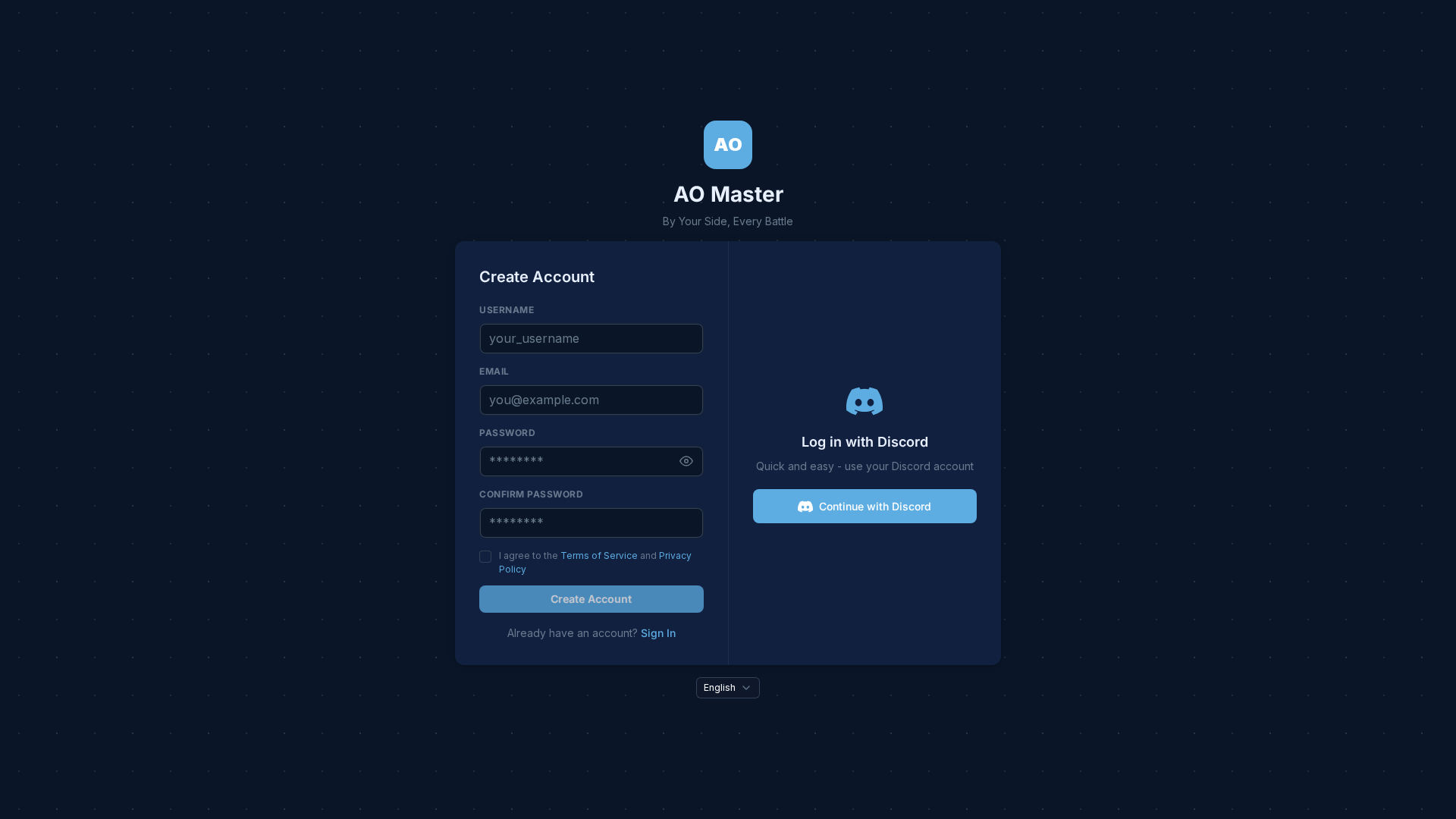
Pick a username
The username is your handle on AO Master. It shows up everywhere your name appears — guild rosters, regear cards, attendance reports, etc.
Rules:
- 3-20 characters.
- Letters, numbers, periods, underscores.
- Must start with a letter.
- Lowercase preferred (the system stores both display + lowercased forms).
- Globally unique — first come, first served. If yours is taken, pick another.
You can change the display version of your username later (capitalisation cosmetics) but the lowercased base form is permanent.
Use any email
The email is just for sign-in + recovery + occasional notifications. AO Master sends very little email — basically just verify-your-email + password-reset.
- Don't use your Albion Online email if you're worried about cross-contamination. AO Master never sees your Albion password.
- Throwaway emails (Mail.com, Protonmail aliases, etc.) work fine. AO Master just needs to know that someone holds the inbox.
Pick a strong password
Standard password rules. AO Master uses bcrypt to store hashes — your password never goes to disk in plaintext.
Use a password manager. The whole "remember your password" thing is solved at this point.
Agree to ToS / Privacy
Tick the agreement checkbox. Both documents are linked at the bottom of the form — give them a skim if you're a careful reader.
Click Create Account
The form submits. AO Master sends a verification email to the address you typed. Open the email + click the link in it; you're verified + auto-signed-in.
Discord sign-in
Faster path: click Continue with Discord on the right panel. Discord opens its OAuth screen → approve → you're back on AO Master, signed in, no separate password to remember.
Notes on Discord sign-in:
- AO Master gets your Discord username + avatar + a stable Discord user ID. That's it — no message read access, no guild-write access.
- Your email is fetched from Discord (the one tied to your Discord account). It's pre-verified through Discord — no separate verify-email step.
- You can link both email/password + Discord later from your account settings, so you can sign in either way.
After sign-up
Sign-up complete + you're signed in. The next screen is /channels/@me (your Home) — empty until you join a guild.
To join a guild:
- A recruiter sent you an enlist link? Open the link (e.g.
https://ao-master.com/enlist/<code>) → click Join. See Member enlist flow. - A guild has its public profile open for recruitment? Browse Guild Discovery → pick a guild → click Apply.
- Starting your own guild? Follow Quick Start — Owners.
Trouble verifying email
| Symptom | Fix |
|---|---|
| Didn't receive the verification email | Check spam / promotions. Wait 2 minutes (some providers buffer). Hit Resend on the post-signup screen. |
| Verification link says "expired" | Verification links expire after 24 hours. Sign in with your password + the system re-sends a fresh link. |
| Mistyped the email | Sign in + go to account settings → change email → re-verify. |
| Forgot the password before verifying | Use the Forgot password flow on /login — it works even pre-verification. |
Username + display username
AO Master stores two related fields:
- Username — the lowercased canonical handle (
demo04,albert_aom). - Display username — what shows up styled (
Demo04,AlbertAOM).
Editing the display version is purely cosmetic. The username (base) can't be changed once verified.
Cross-links
- Member enlist flow — joining your first guild.
- Quick Start — Owners — creating your own guild.
- Quick Start — Members — after joining, your first 5 minutes as a member.