
Leave, kick, and revive
Three related flows for ending (or undoing the end of) a member's tenure in the guild.
Member-initiated leave
Members can leave the guild themselves:
- Open
#Members→ click your own row. - Leave Guild action at the bottom of the drawer.
- Confirm.
You're immediately removed from the guild's member list. Your silver / siphon balances + regear history stay on your character — re-joining (via a fresh enlist link) re-links you to that history.
What stays: silver / siphon balances on your linked character, regear history, attendance records. AO Master account stays active (you can join other guilds).
What you lose: access to the guild's channels, your role assignments, your locker assignment.
Staff kick (soft-delete)
Staff with Manage Members can remove someone:
- Open
#Members→ find the member → click their row. - Kick action at the bottom.
- Optional reason (audit-logged).
- Confirm.
A kick is a soft-delete — the member's row hides from the active roster but the underlying record stays for a 30-day grace window to allow revive. After 30 days the row is fully purged.
The kicked member loses access immediately + can't re-join via the same enlist link (the link is invalidated for them specifically).
Revive
If you kick someone and want to undo:
- Open
#Members→ toggle the Include former members filter on the toolbar. - Soft-deleted rows show with a grey "kicked" badge + the days remaining in the revive window.
- Open the row → Revive action.
- Confirm.
The member is restored with their original roles, locker assignment, and history. They can re-access the guild immediately.
After the 30-day window passes, revive is no longer available. The row is purged + the member can re-join only via a fresh enlist link (with no history).
Self-revive doesn't exist
A kicked member can't revive themselves. Only a staff member with Manage Members can. If you're a kicked member who wants back in, ask staff (out-of-band) to revive you within the window.
Auto-kick on Albion leave (Member side)
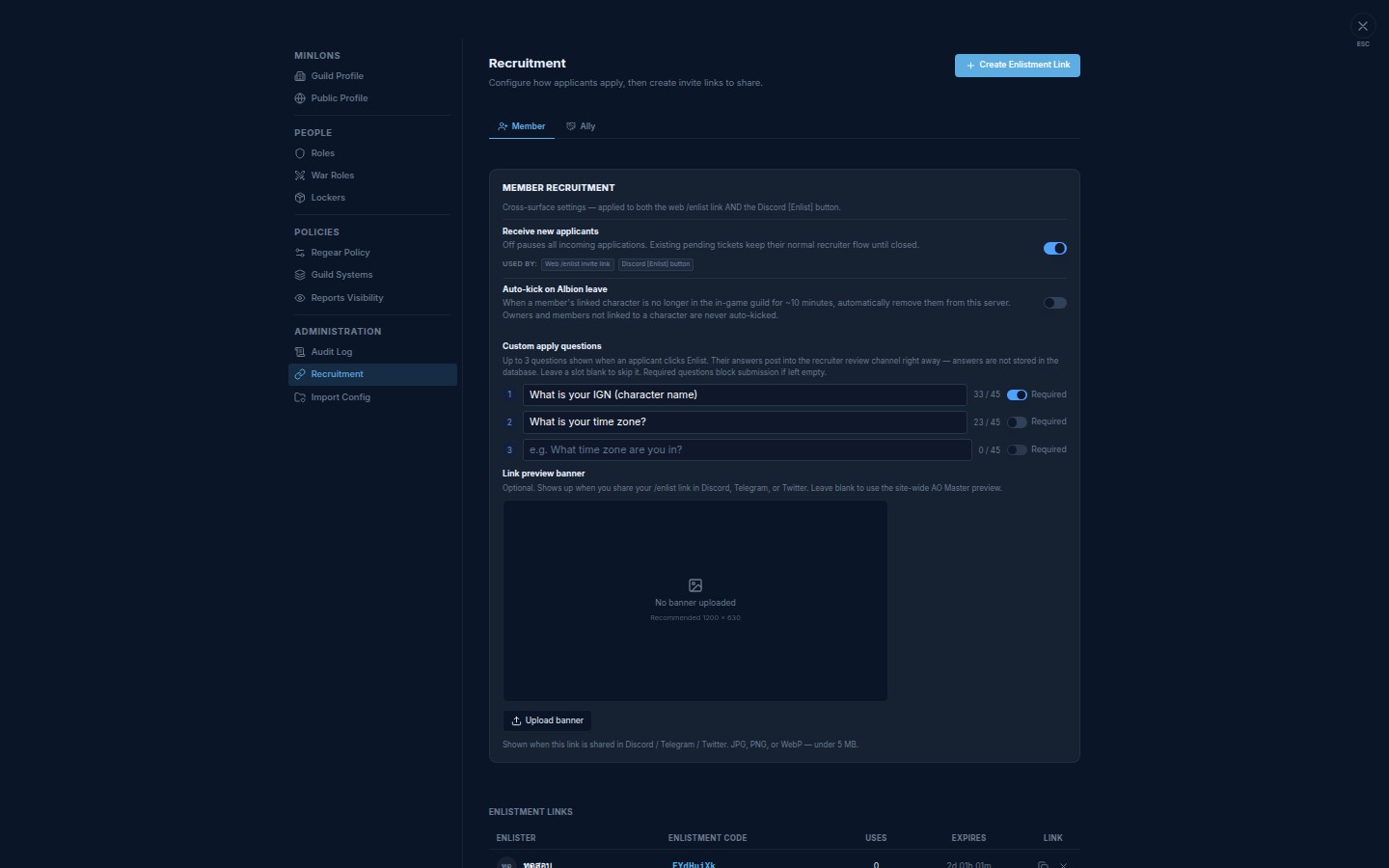
A staff opt-in toggle that watches for members whose linked Albion character has left the in-game guild, then kicks them automatically — no manual review needed.
How it works
- Every 5 minutes, AO Master refreshes the in-game roster for your guild.
- When a linked character is missing two checks in a row (≈ 10 minutes total), that member is removed from your server automatically.
- The kick uses the same path as a manual staff kick — the row goes into the 30-day revive window so you can undo it from the Include former members filter if it fires by accident.
Who is never auto-kicked
- Guild owner — web ownership stays even if the character leaves in-game.
- Members not linked to a character — staff-only accounts (helpers who manage regear or approve enlist tickets but don't play) are skipped on purpose.
Turn it on
Staff with Manage Integrations (or the guild owner) can flip the toggle:
- Open Settings → Recruitment → Member tab.
- Find Auto-kick on Albion leave, under Receive new applicants.
- Flip it on.
- Save.
The toggle takes effect on the next 5-minute check.
Pair with Discord Role Sync
If your guild uses the Discord bot, set Discord Role Sync to 🔴 Strict — immediate purge in Discord Integration. When the auto-kick fires, the bot also strips the member's Discord roles in the same sweep — no separate cleanup needed.
On 🟡 Manual review instead, auto-kicked members appear in the review list for you to confirm before role removal.
Cross-links
- #Members channel — where the leave / kick / revive actions live.
- Settings → Audit Log — every kick + revive is logged with actor + reason.
- Members — Link character — character link survives kick/revive intact.
- Alliance — being an ally — sister toggle for the Ally pipeline.
- Link previews — the Link preview banner card sits in the same tab as the Auto-kick toggle.