
Quick Start — Staff
You were just promoted to staff in a guild — an Owner or another staff member granted you one or more permissions on Settings → Roles. This page walks the channels + actions that unlock once you hold staff permissions.
If you're a brand-new member who hasn't been promoted yet, see Quick Start — Members first.
If you're the Owner of the guild, see Quick Start — Owners.
What changes in your sidebar
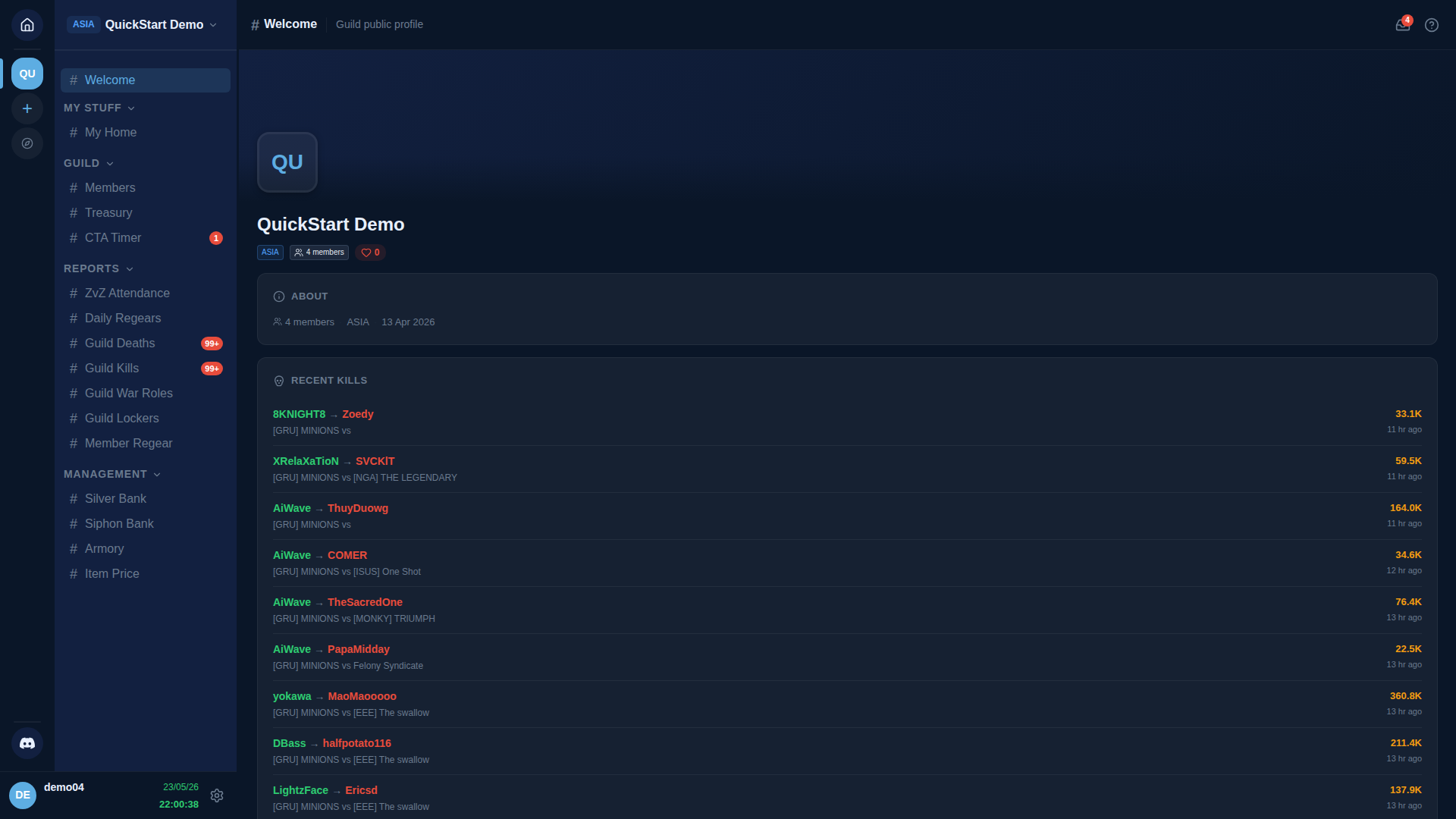
Staff permissions add new channel groups to your sidebar. The exact groups depend on which permissions you hold.
| New section in sidebar | Unlocked by | What it gates |
|---|---|---|
| REGEAR TEAM (Review Requests, Cut-off Tasks) | Approve Regear Requests, Claim Cut-off Tasks | Approve / reject regears, pack cut-off tasks |
| MANAGEMENT — Silver Bank / Siphon Bank / Armory / Item Price | View Banks, Armory & Item Price | See balances + transactions + inventory |
| MANAGEMENT — Announcements | Manage Announcements | Post + edit guild announcements |
| MANAGEMENT — Discord Integration | Manage Integrations | Pair / configure the Discord bot |
| MANAGEMENT — CTA Maker | Manage ZvZ Events or Shot Call Party Board | Schedule CTAs + manage party comps |
| GUILD — Join Requests | Approve Enlist Members | Approve / reject applicants |
The screenshot above is from a member holding the Manager role — note MANAGEMENT appeared (Silver Bank, Siphon Bank, Armory, Item Price) because Manager has View Banks, Armory & Item Price + Manage Banks, Armory & Item Price. The same screenshot taken with Regear Staff instead would show REGEAR TEAM at the bottom of the sidebar instead.
Step 1 — Find out exactly which permissions you have
On any guild's #My Home, the My Status card lists your roles + effective permissions. You can also check #Members → your own row → click for the drawer.
If you're missing a permission you think you should have, ask an Owner — only an Owner or someone with Manage Roles can grant them.
Step 2 — Walk the relevant deep-dive(s)
Depending on what you've been promoted for:
- Reviewing regears — Staff — review + approve. Read Settings → Regear Policy too so you understand what the policy auto-decides vs leaves to you.
- Packing cut-off tasks (item mode) — Item mode — cut-off + locker.
- Paying out silver (silver mode) — Silver mode — payout.
- Managing Silver Bank — Silver Bank.
- Managing Armory — Armory + Low Stock.
- Approving join requests — #Join Requests + Member enlist flow.
- Scheduling + running CTAs — Plan an event with CTA Maker + Run + track attendance.
- Editing roles + permissions — Settings → Roles + Members — assign roles + permissions.
- Locker config — Settings → Lockers + Members — Locker assignment.
- Discord bot — Settings → Discord Integration + Discord — Install + pair.
Step 3 — Get familiar with the Audit Log
Every action you take that changes state writes a row to Settings → Audit Log. It's your friend — anyone can see who did what when. Don't be surprised when your decisions show up there.
What you still can't do
Even with most staff permissions, only the Owner of the guild can:
- Delete the guild (Settings → Delete Guild).
- Bypass every other permission check (Owner = Administrator-by-default).
If you need an action only the Owner can do, get them to do it — there's no workaround.
Cross-links
- Settings → Roles — read this to understand the permission system, even if you can't edit roles yourself.
- Permissions reference — every permission with what it gates.
- Quick Start — Members — fresh-member primer if you haven't read it.